
Is Laravel Better Than WordPress? Honest Pros, Cons & Verdict

Is Laravel better than WordPress? For custom web applications such as portals, SaaS products, booking systems and dashboards, yes. For blogs, brochure sites and content-heavy marketing websites, WordPress is usually the smarter, cheaper choice. The right answer in the Laravel vs WordPress debate depends on what your website actually needs to do.
I get this question almost every week. A client sends a message like, "My friend said WordPress is outdated and I should build on Laravel. Is that true?" Sometimes the friend is right. Often, they are about to make a client spend three times the budget on something a well-built WordPress site would handle perfectly.
In this guide I will skip the fan-boy arguments. You will see the real advantages of Laravel vs WordPress, the situations where WordPress clearly wins, and a simple test you can run on your own project in five minutes. If you want the broader overview first, read my main Laravel vs WordPress comparison.
Why "Better" Is the Wrong Question (at First)
Laravel and WordPress are not two versions of the same product. They sit at different levels.
- WordPress is a ready-made content management system. You install it and you already have an admin panel, pages, posts, users and a media library.
- Laravel is a PHP framework. It gives developers the building blocks (routing, database, authentication, queues) to create exactly the application you need.
Comparing them is a bit like comparing a furnished apartment with a plot of land and a great construction crew. The apartment is ready today. The land lets you build anything, but you pay for the building.
So the useful question is not "which is better?" but "better for what?" Let's answer that properly.
Is Laravel Better Than WordPress for Custom Web Applications?
Yes, and by a wide margin. The moment your project stops being "pages with content" and becomes "software with users, rules and data", Laravel starts to pull ahead.
Here is a real-world pattern I see all the time. A training company starts on WordPress. They add a booking plugin, then a membership plugin, then a payment add-on, then a custom field plugin to link it all together. Two years later they have 38 plugins, a slow dashboard and a booking flow that breaks after every update. Nobody fully understands how the pieces fit.
Rebuilt in Laravel, the same system becomes one codebase with clear models: Course, Session, Booking, Payment. Every rule lives in one place. Updates stop being scary.
Signs your project is really an application
- Different user roles see different dashboards (admin, staff, customer, vendor).
- You need complex business rules: pricing tiers, approvals, commissions, inventory.
- Users create and manage their own data, not just read your content.
- You need integrations with CRMs, ERPs, payment gateways or mobile apps.
- You expect the product to grow for years with new features.
If three or more of these sound like you, Laravel is very likely the better foundation. My multi-store POS and inventory system is a good example of a project that would have been painful on WordPress.
Advantages of Laravel vs WordPress
Let's get specific. These are the advantages that actually matter to business owners, not just developers.
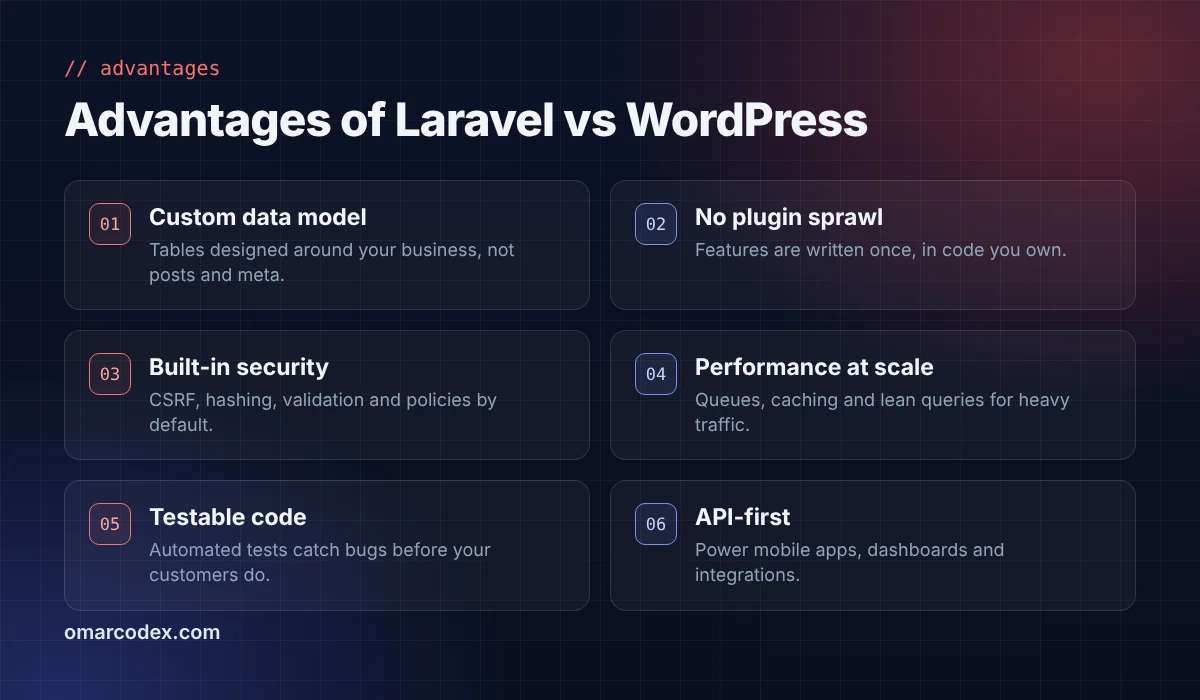
A data model built around your business
WordPress stores almost everything as "posts" with extra "meta" fields. It works, but when you have orders, invoices, vehicles or students, that structure gets awkward and slow. Laravel lets your developer design proper database tables for exactly what you sell or manage.
No plugin sprawl
Every WordPress plugin is code written by a different team, with its own updates and its own priorities. In Laravel, features are written once, in code you own. There is no surprise when a plugin author abandons a project or changes the licence.
Security built into the framework
Laravel ships with CSRF protection, password hashing, input validation, encrypted cookies and authorization policies out of the box. WordPress core is also secure, but most real-world WordPress hacks come through outdated or poorly written plugins. Fewer third-party parts means a smaller attack surface. The OWASP Top 10 is a good reference for what both platforms must defend against.
Performance under real load
Laravel gives you queues for slow jobs (emails, reports, image processing), fine-grained caching and full control over database queries. Heavy dashboards stay fast because you only load what each screen needs.
Automated testing
Laravel makes it natural to write tests that check your checkout, your permissions and your calculations every time code changes. That means fewer bugs reach your customers.
API-first by design
Need a mobile app, a partner integration or a React front end later? Laravel's API tools make that a normal part of the project rather than an afterthought.
Where WordPress Still Wins
Now the other side, because it is just as important. For many businesses, WordPress is the better choice, and choosing Laravel would be overkill.
- Speed to launch. A professional WordPress site can go live in days or a couple of weeks. A custom Laravel build takes longer.
- Lower upfront cost. Themes and plugins cover common needs: contact forms, SEO, galleries, simple shops.
- Easy editing. Your marketing team can update pages and publish posts in the block editor without calling a developer.
- Huge ecosystem. WordPress powers roughly four in ten websites on the internet, so help, themes and developers are easy to find.
- Content and blogging. Categories, tags, revisions, scheduled posts and SEO plugins all come ready.
If your site is mainly a shop window for your business, WordPress is not "outdated". It is the right tool. Just build it properly; my fast WordPress website checklist shows how to keep it quick and clean.
Laravel vs WordPress for SEO and Performance
A common myth says one platform is "better for SEO". Google does not rank frameworks. It ranks pages that are fast, useful and well structured.
With WordPress you get SEO plugins, sitemaps and schema with a few clicks. The risk is bloat: heavy themes, page builders and dozens of scripts can hurt your Core Web Vitals.
With Laravel, nothing is added unless your developer adds it. That means lean pages and excellent speed, but also that meta tags, sitemaps, canonical URLs and structured data must be built deliberately. A good Laravel developer handles this from day one; an inexperienced one may forget it entirely.
Actionable tip: whichever platform you choose, ask your developer to show you a test page scoring well in PageSpeed Insights before launch, not after.
What About Cost Over Time?
Budget is often the deciding factor, so let's look beyond the first invoice.
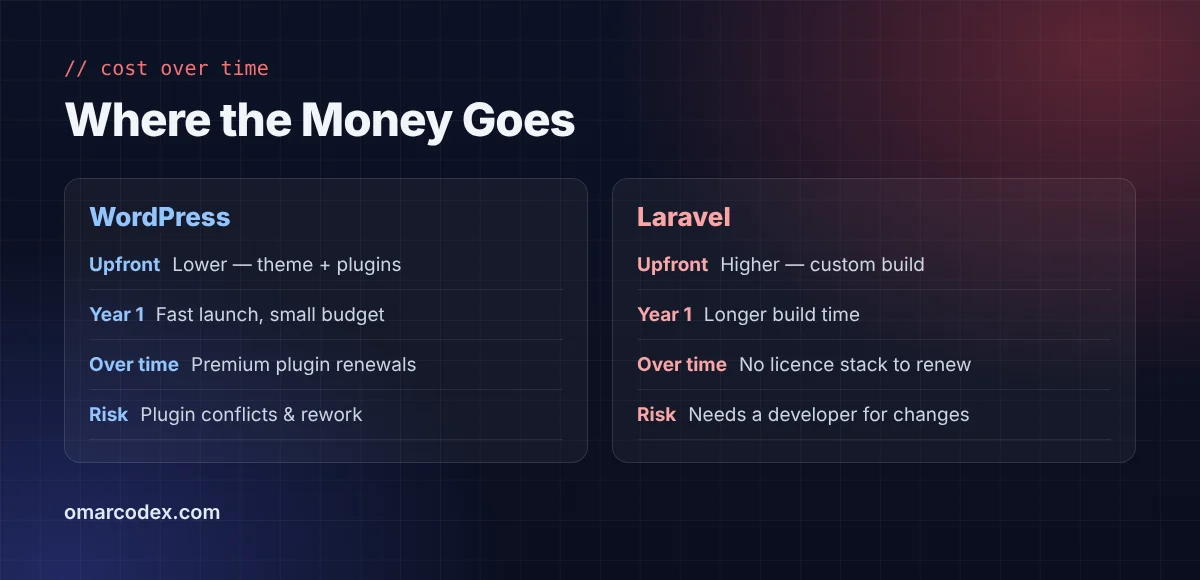
WordPress is cheaper upfront. But premium plugins renew every year, and complex plugin stacks often need expensive fixes when updates conflict. For a simple site, total cost stays low. For a complex one, it creeps up quietly.
Laravel costs more at the start because everything is built for you. After that, there is no licence stack to renew, and new features slot into a clean codebase. For applications that grow, the total cost of ownership is often lower after two or three years.
Also factor in payments. If you plan to take money online, read my comparison of Stripe vs PayPal vs SSLCommerz, because the gateway choice affects both platforms.
A Five-Minute Test to Decide for Your Project
Grab a notebook and answer these honestly. This is the same quick check I run with clients on our first call.
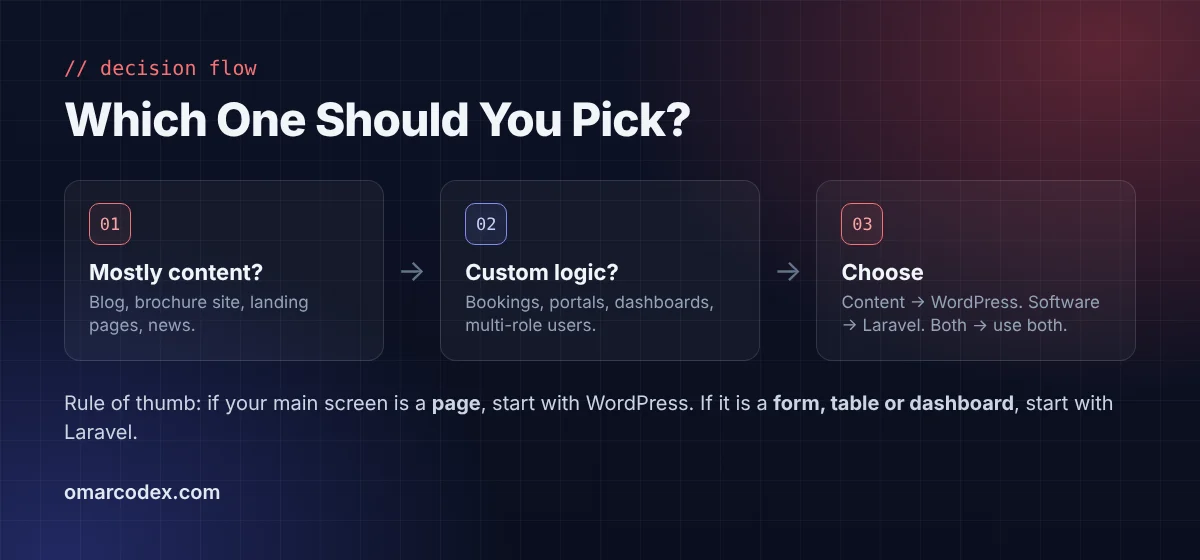
- What is the main screen of your website? If it is a page or an article, lean WordPress. If it is a form, a table or a dashboard, lean Laravel.
- Who creates the data? If only your team publishes content, WordPress fits. If customers create accounts, bookings or orders with custom rules, Laravel fits.
- How many plugins would you need? If you are already listing more than 15 to make it work, that is a warning sign.
- Where will it be in three years? A stable marketing site favours WordPress. A product with a roadmap favours Laravel.
- What is your launch deadline and budget? Tight deadlines and small budgets favour WordPress, at least for version one.
If your answers are mixed, that is normal. It usually points to the hybrid approach below.
Using Laravel and WordPress Together
You don't always have to choose. Many successful businesses run WordPress for marketing (homepage, blog, landing pages) and Laravel for the product (customer portal, SaaS, booking engine), often on a subdomain such as app.yourdomain.com.
Your marketing team keeps an editor they love. Your product gets a codebase that can scale. If you are curious what a Laravel-based CMS looks like instead, I compare the options in Laravel CMS vs WordPress.
Common Mistakes When Choosing Between Them
- Choosing Laravel for a five-page brochure site. You pay for flexibility you never use.
- Forcing WordPress to be a SaaS. Plugin stacks become fragile and expensive to maintain.
- Choosing based on a developer's comfort, not your needs. Ask why a platform fits your project.
- Ignoring the editing experience. If your team cannot update content easily, the site goes stale.
- Forgetting about SEO during a migration. Moving platforms without 301 redirects can wipe out years of rankings.
What a Good Developer Should Tell You
Here is a quick way to judge the advice you are getting. A trustworthy developer will ask about your business before naming a platform. They will want to know who uses the site, what users do on it and where it is headed.
Be careful if someone recommends Laravel for everything, or WordPress for everything. Every tool has trade-offs. The right person will explain those trade-offs in plain language, give you a realistic timeline and tell you what maintenance will look like after launch.
Actionable tip: ask for one example of a project they built on each platform and why they chose it. The answer tells you whether they think about your goals or just their favourite tool.
Frequently Asked Questions
Can a beginner build a website with Laravel?
Not easily. Laravel requires solid PHP knowledge, an understanding of databases and comfort with the command line. Beginners who want a site without code should start with WordPress.
Is Laravel faster than WordPress?
A well-built Laravel app is usually faster for complex, data-heavy screens because nothing unnecessary loads. For simple content pages, a lightweight, well-cached WordPress site can be just as fast.
Will switching from WordPress to Laravel hurt my Google rankings?
It doesn't have to. Keep the same URLs where possible, set up 301 redirects for any that change, preserve titles and meta descriptions, and submit the new sitemap in Search Console.
Is WordPress less secure than Laravel?
WordPress core is well maintained. Most incidents come from outdated plugins, weak passwords or cheap hosting. Keep everything updated and use fewer, trusted plugins, and WordPress can be very secure.
Can I run an online store on Laravel?
Yes. Laravel is great for stores with custom pricing, subscriptions, B2B rules or multi-vendor setups. For a standard shop, WooCommerce or Shopify is quicker and cheaper to launch.
How long does a Laravel project take compared to WordPress?
A typical WordPress business site takes one to four weeks. A custom Laravel application usually takes from six weeks to several months, depending on features.
Final Verdict
So, is Laravel better than WordPress? For custom software, portals and products that need to grow, yes: it gives you cleaner code, stronger security by design and room to scale. For content sites, blogs and most small-business websites, WordPress wins on speed, cost and ease of editing.
The best choice is the simplest tool that will still serve you well in two years. If you are unsure, describe your project and I will tell you honestly which one fits. Explore my Laravel development and WordPress development services, or book a free consultation today.
Written by Omar Faruk
Full-Stack Developer — WordPress, Laravel & Shopify
I'm a full-stack web developer who has shipped news portals, company sites, multi-user web apps and Shopify stores for clients around the world. I care about clean code, fast pages and websites that actually bring in sales.
Need help with this on your site?
I can set it up for you — quick turnaround, fixed price.


