Laravel CMS vs WordPress: Statamic, Filament & More Compared

Laravel CMS vs WordPress comes down to control versus convenience. WordPress gives you a ready-made editor, thousands of plugins and fast launches. A Laravel CMS such as Statamic, Filament or Twill gives you a cleaner, faster, fully custom content system that grows with your business, at a higher upfront cost.
Most comparisons stop at "Laravel is a framework, WordPress is a CMS". That was true a few years ago. Today, the Laravel world has mature content management systems of its own, and they deserve a fair look.
In this guide you'll meet the main Laravel CMS options, see how they stack up against WordPress feature by feature, and learn which one suits your project. If you are still deciding between the two platforms at a higher level, start with my Laravel vs WordPress guide.
What Is a Laravel CMS?
A Laravel CMS is a content management system built on top of the Laravel framework. You get an admin panel where editors manage pages, posts, images and settings, just like WordPress. Under the hood, though, everything runs on modern Laravel code.
That matters for two reasons:
- Your content side and your application side can live in one codebase. A blog, a customer portal and an API can share users, data and design.
- Developers extend it with normal Laravel code instead of WordPress hooks and plugins, which keeps custom features clean and testable.
Think of it as getting WordPress-style editing without giving up Laravel's flexibility.
Popular Laravel CMS Options in Plain Language
There is no single "Laravel CMS". There are several, each with a different personality.
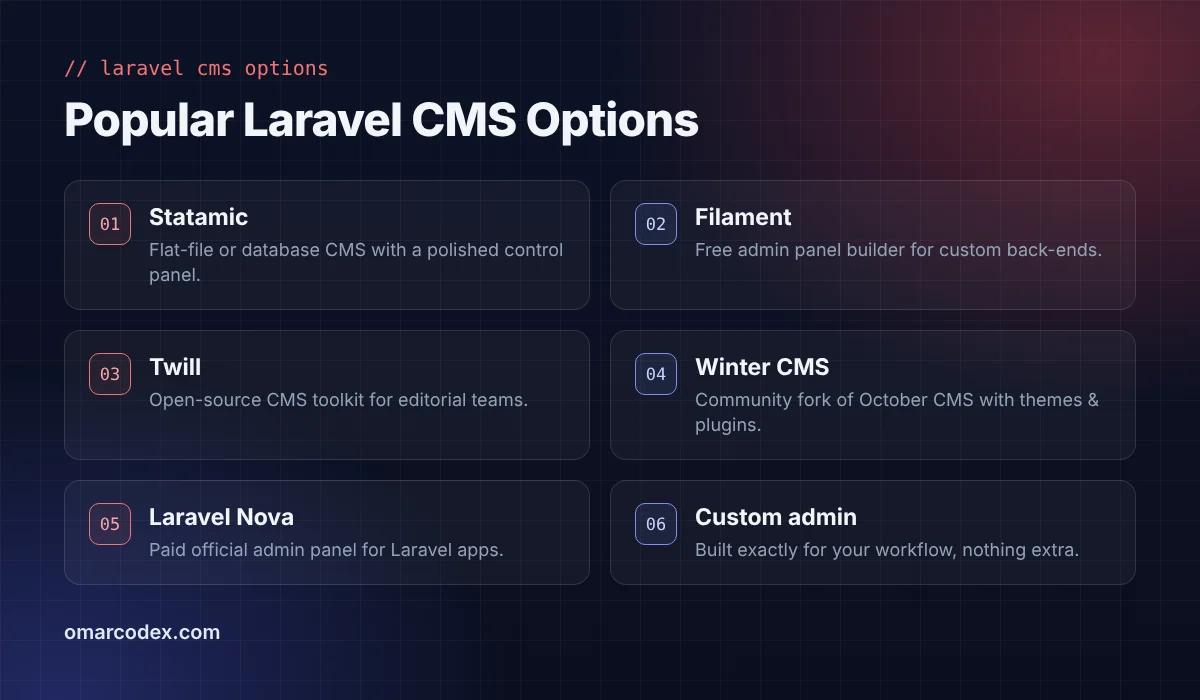
Statamic
Statamic is the closest thing to "WordPress, but Laravel". It has a polished control panel, flexible content blueprints and can store content in flat files (great for Git workflows) or a database. There is a free edition for simple sites and a paid Pro licence for larger teams.
Best for
Marketing sites, agencies and content-rich websites that want a beautiful editor and top-tier performance.
Filament
Filament is a free, open-source admin panel builder. It is not a CMS out of the box, but developers can build content management screens, dashboards and forms with it very quickly.
Best for
Businesses that need a custom back office plus some content editing, such as a SaaS with a blog or a booking platform with editable pages.
Twill
Twill is an open-source CMS toolkit created by the digital agency AREA 17. It focuses on structured content and block-based editing for editorial teams.
Winter CMS
Winter CMS is a community-driven fork of October CMS. It offers themes, plugins and a traditional CMS feel, which makes it familiar for people coming from WordPress.
Laravel Nova and custom admin panels
Laravel Nova is the official, paid admin panel for Laravel apps. Many projects also use a fully custom admin designed around one workflow and nothing else.
Laravel CMS vs WordPress: Side-by-Side Comparison
Here is how the two approaches compare on the points business owners care about most.
Content editing experience
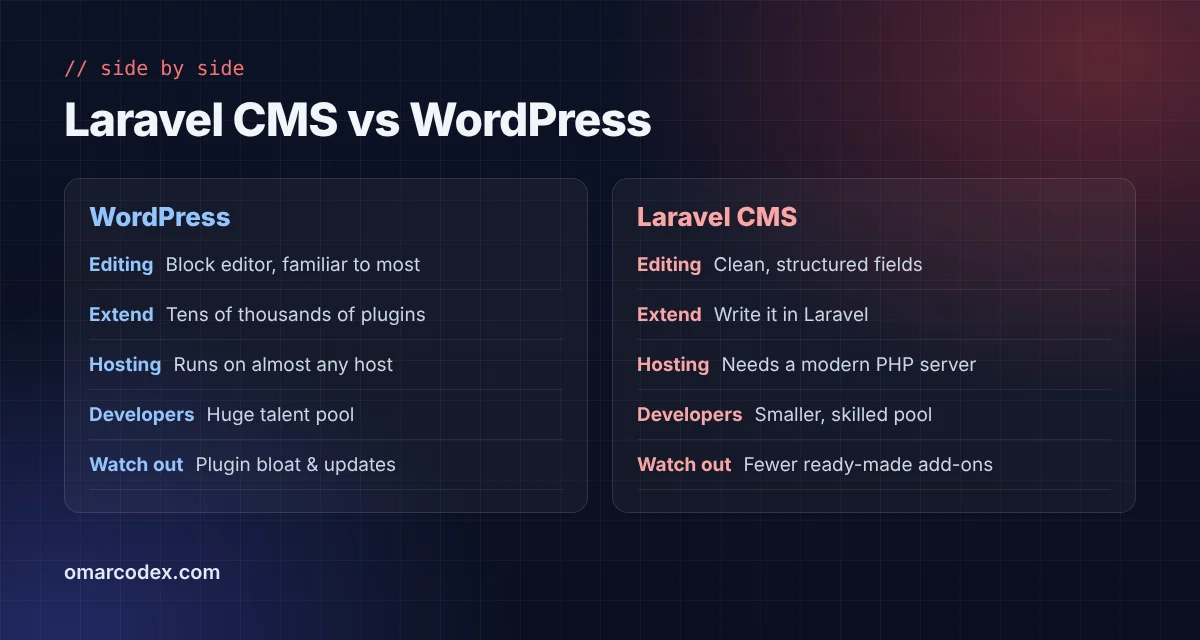
WordPress's block editor is familiar to millions of people. If your team has used WordPress before, they will be productive on day one. Laravel CMS editors such as Statamic are often cleaner and more structured, because developers define exactly which fields each page needs. Editors can't accidentally break the layout.
Extensions and features
WordPress has tens of thousands of plugins in the official directory alone. Need a form, a slider or an events calendar? Install it in minutes. Laravel CMS ecosystems are much smaller, so unusual features are usually custom-built. That costs more but avoids plugin conflicts.
Performance
A Laravel CMS loads only what you build, so pages are lean by default. WordPress can be just as fast, but it takes discipline: a lightweight theme, few plugins and good caching. My fast WordPress website checklist covers exactly how.
Security and maintenance
WordPress's popularity makes it the most targeted CMS on the web, and plugins are the usual weak spot. A Laravel CMS has fewer third-party moving parts, which means fewer emergency updates. Both still need regular updates, backups and good hosting.
Hosting and developers
WordPress runs on almost any cheap shared host, and you can find WordPress developers everywhere. A Laravel CMS needs a modern PHP server (a VPS or managed Laravel hosting) and a developer who knows Laravel well. The talent pool is smaller but usually more experienced.
When a Laravel CMS Is the Better Choice
A Laravel CMS shines when your website is more than a website. Here are the scenarios where I recommend it:
- Content plus an application. A SaaS, marketplace or portal that also needs a blog, help centre or landing pages.
- Highly structured content. Property listings, course catalogues, product specs or directories with strict fields.
- Performance-critical sites where every millisecond affects conversions.
- Teams that hate plugin maintenance and want one codebase they fully control.
- Long-term products where the roadmap is full of custom features.
For example, on the Offer Blue Vertex CPA affiliate network project, the business logic was far beyond what a plugin stack could handle cleanly. A Laravel foundation made the custom rules and dashboards easy to maintain.
When WordPress Is the Smarter Pick
For many projects, WordPress remains the practical winner. Choose it when:
- Your site is a blog, portfolio, brochure site or news site.
- You need to launch quickly on a modest budget.
- Non-technical staff will manage content daily and already know WordPress.
- Your features are standard and well covered by trusted plugins.
- You want the freedom to hire from a huge pool of developers later.
Choosing WordPress here is not settling. It's using the right tool for the job.
The Hybrid Approach: Use Both
Here is a secret that many agencies won't tell you: a lot of growing companies end up running both platforms side by side.
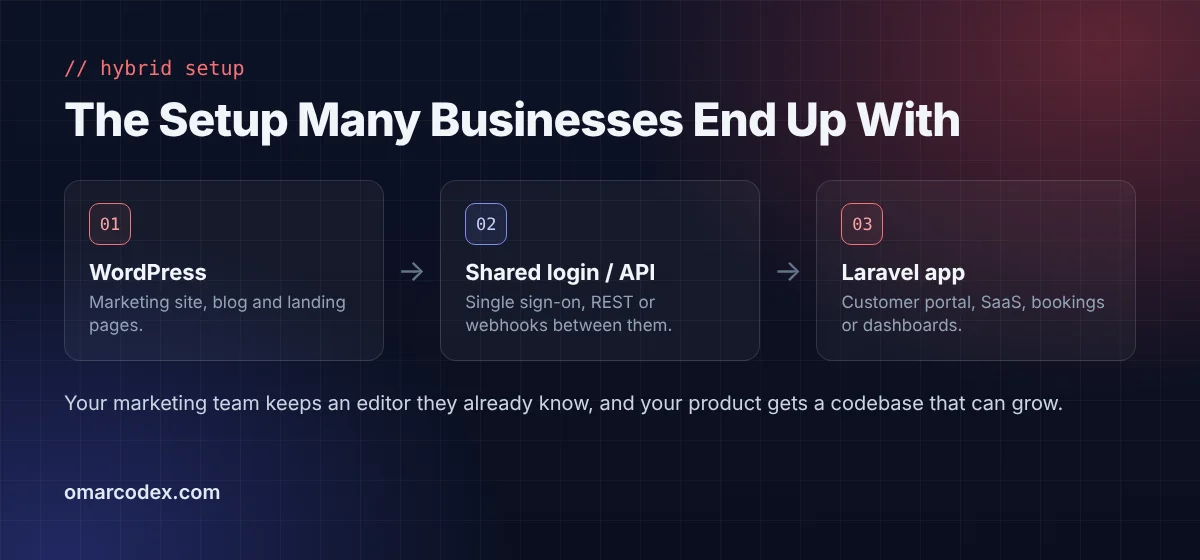
WordPress handles the marketing site and blog at yourdomain.com. A Laravel app runs the product at app.yourdomain.com. The two connect through an API, webhooks or single sign-on.
Marketing keeps the editor it loves. Engineering keeps a clean codebase. You avoid forcing either platform to do something it was never designed for. If you are weighing whether Laravel alone is the stronger option, my article Is Laravel Better Than WordPress? walks through the advantages in detail.
Migrating From WordPress to a Laravel CMS Without Losing SEO
Moving platforms is where rankings get lost. Follow these steps to protect your traffic:
- Crawl your current site and export every URL, title, meta description and image alt text.
- Keep the same URL structure wherever you can. Where URLs must change, set up permanent 301 redirects.
- Rebuild schema markup, XML sitemaps and canonical tags, since you won't have an SEO plugin doing it for you.
- Test on staging with PageSpeed Insights and a full crawl before going live.
- Submit the new sitemap in Google Search Console and watch the coverage reports for a few weeks.
Google's own site move guidelines are worth reading before you start.
Cost: What to Expect
A WordPress site built on a quality theme is usually the cheapest way to launch. Expect ongoing costs for hosting, premium plugin renewals and maintenance.
A Laravel CMS project costs more upfront because content models, templates and admin screens are built for you. In return, you get fewer licences to renew and a codebase that absorbs new features without a rebuild. If you will also take payments, compare gateways early with my guide to Stripe vs PayPal vs SSLCommerz.
Actionable tip: ask any developer for a three-year cost estimate, not just the build price. The cheaper option on day one isn't always the cheaper option by year three.
Questions to Ask Before You Choose
Before you sign off on either platform, sit down with your team and answer these questions. They reveal more than any feature table.
Who will edit content every week?
If it's a marketing team that already knows WordPress, switching them to a new editor has a real cost in training and frustration. If editors are new to both, a well-configured Laravel CMS is often easier to learn because it only shows the fields they need.
How unique is your content structure?
Simple pages and posts fit WordPress perfectly. If you publish things like property listings with 40 fields, multi-level course catalogues or product data synced from an ERP, a Laravel CMS lets you model that content exactly, instead of stretching custom fields plugins to their limit.
Will the site need user accounts later?
This is the question people forget. A membership area, client portal or dashboard added later can turn a simple WordPress site into a fragile plugin stack. If accounts are on the roadmap, building on Laravel from the start saves a painful rebuild.
Who maintains it after launch?
WordPress can be maintained by almost any developer or agency. A Laravel CMS needs someone comfortable with Laravel, Composer and deployments. Make sure you have that support lined up before launch, not after something breaks.
What does success look like in three years?
Picture your website in three years. If it looks much the same, just with more articles, WordPress is a safe bet. If you imagine new tools, integrations and customer features, a Laravel CMS gives you the room to get there.
Frequently Asked Questions
Is there a Laravel equivalent of WordPress?
Statamic is the closest equivalent. It offers a full control panel, content blueprints, user roles and an add-on marketplace, all built on Laravel.
Can my team edit a Laravel CMS without coding?
Yes. Once a developer sets up the content fields, editors work in a visual control panel. Many clients find it simpler than WordPress because there are fewer options to get lost in.
Is Filament a CMS?
Not exactly. Filament is an admin panel builder. Developers use it to create content management screens, dashboards and forms tailored to a specific project.
Can I use WordPress as a headless CMS with a Laravel front end?
Yes. WordPress's REST API can serve content to a Laravel application. It works well when editors love WordPress but the front end needs custom logic.
Which is better for a multilingual website?
Both can handle it. WordPress relies on plugins such as WPML or Polylang, while Statamic supports multi-site and multilingual content natively. The best choice depends on how many languages and how much content you manage.
Do Laravel CMS platforms have themes like WordPress?
Some do, such as Winter CMS and Statamic starter kits. Most Laravel CMS projects use a custom design, which keeps pages lighter and more unique.
Final Thoughts
The Laravel CMS vs WordPress decision is really about what your website needs to become. WordPress wins on speed to launch, familiarity and its massive ecosystem. A Laravel CMS wins on structure, performance, security and the freedom to grow into a full application.
If your site is mostly content, start with WordPress. If content is only part of a bigger product, a Laravel CMS will save you headaches later. Still unsure? Tell me about your project and I'll recommend the option that fits. Explore my Laravel development and WordPress development services, or get a free consultation.
Written by Omar Faruk
Full-Stack Developer — WordPress, Laravel & Shopify
I'm a full-stack web developer who has shipped news portals, company sites, multi-user web apps and Shopify stores for clients around the world. I care about clean code, fast pages and websites that actually bring in sales.
Need help with this on your site?
I can set it up for you — quick turnaround, fixed price.


