
Google Ads Account Suspended? How to Fix It in 2027

// tl;dr
Read the policy named in the notice, fix the cause first, never open a new account, check linked accounts, complete verification if asked, then send one short, factual appeal.
Your ads stopped. Sales dropped the same day. You log in to Google Ads and see a red bar at the top: your Google Ads account is suspended.
It's scary, and the notice doesn't say much. The good news is that most suspensions follow a clear pattern. Once you know which type you have, you know what to fix.
In this 2027 guide, we'll show you how to find the real reason, fix it, and send one strong appeal. We'll also cover store-owner problems most guides skip. One example: a Merchant Center suspension that takes your Shopping ads down with it.
Why Was My Google Ads Account Suspended?
Google's account suspensions overview lists the main reasons. Most fall into three groups.
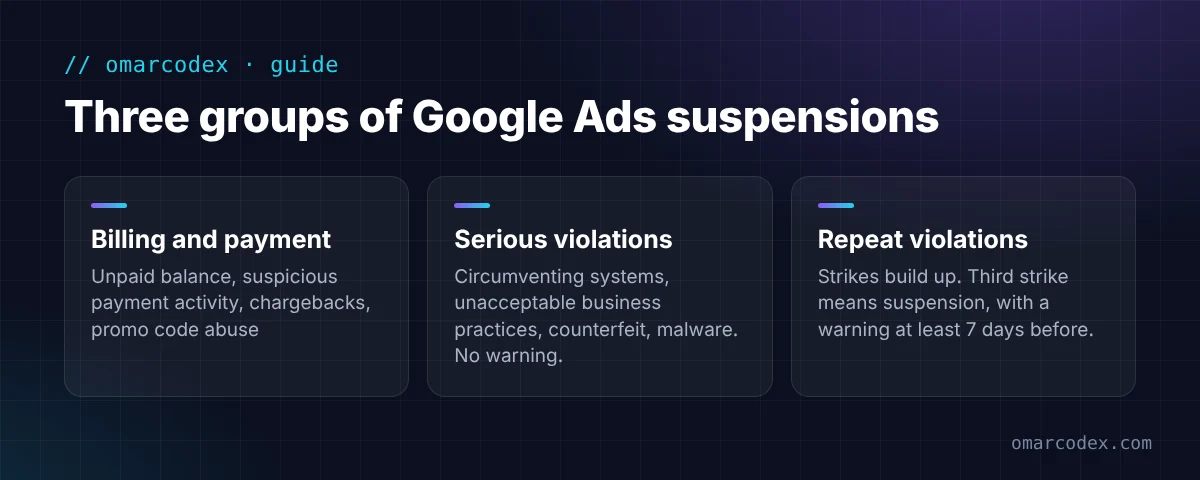
1. Billing and payment problems
- An unpaid balance or failed payments
- Suspicious payment activity (Google can't trust the card or the person paying)
- A chargeback on a real charge
- Promo code abuse, like using more than one code on an account
Sometimes Google only pauses the account. You may just need to confirm your payment method or pay a small amount.
2. Serious policy violations
Google calls these "egregious." They cause a suspension right away, with no warning. The ones store owners hit most:
- Circumventing systems: trying to get around Google's checks. For example, opening a new account after a suspension, or showing Google a different page than shoppers see.
- Unacceptable business practices: hiding who you are, selling things you can't deliver, or pretending to be another brand.
- Counterfeit: selling fakes or "inspired" copies of branded goods.
- Malicious software: malware or hacked code on your site.
3. Repeat policy violations
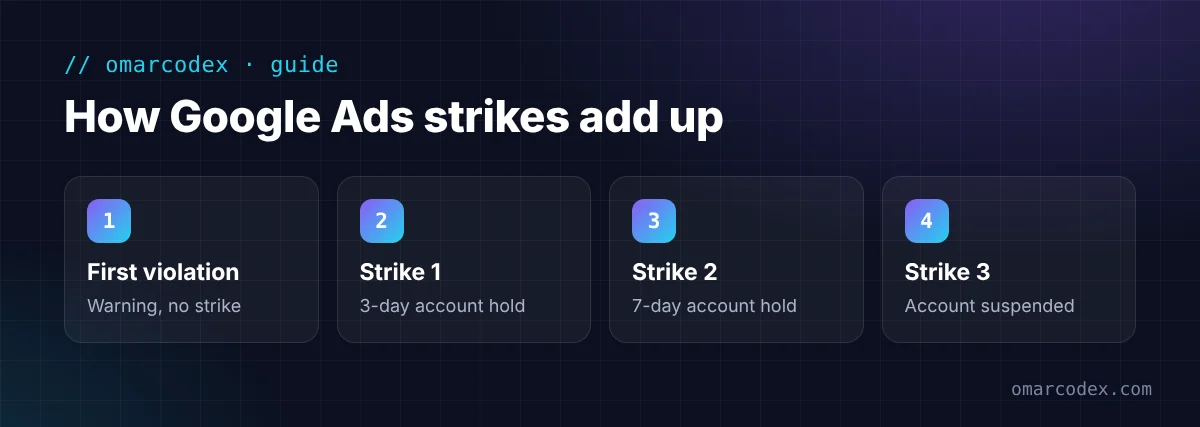
These build up. Google's first violation gets a warning, with no strike. After that, strikes start. The first two strikes put your account on hold for 3 and then 7 days. A third strike means suspension. Google sends a warning at least 7 days before it suspends you for repeat violations.
How to Read Your Suspension Notice
The notice names a policy. That name is your best clue, so don't skip it.
- Sign in and read the banner at the top of your account.
- Note the policy name, like "Suspicious payment activity" or "Circumventing systems."
- Click the policy link and read Google's page for it.
- Check your email, including spam, for messages from Google Ads and Google Payments.
- Look at Admin > Policy for any tasks, like verification.
If the notice mentions Merchant Center, the real problem may be there. A suspended Merchant Center account stops your Shopping ads. Read our guide to fixing a Google Merchant Center misrepresentation suspension if that's your case.
How to Fix a Suspended Google Ads Account: Step by Step
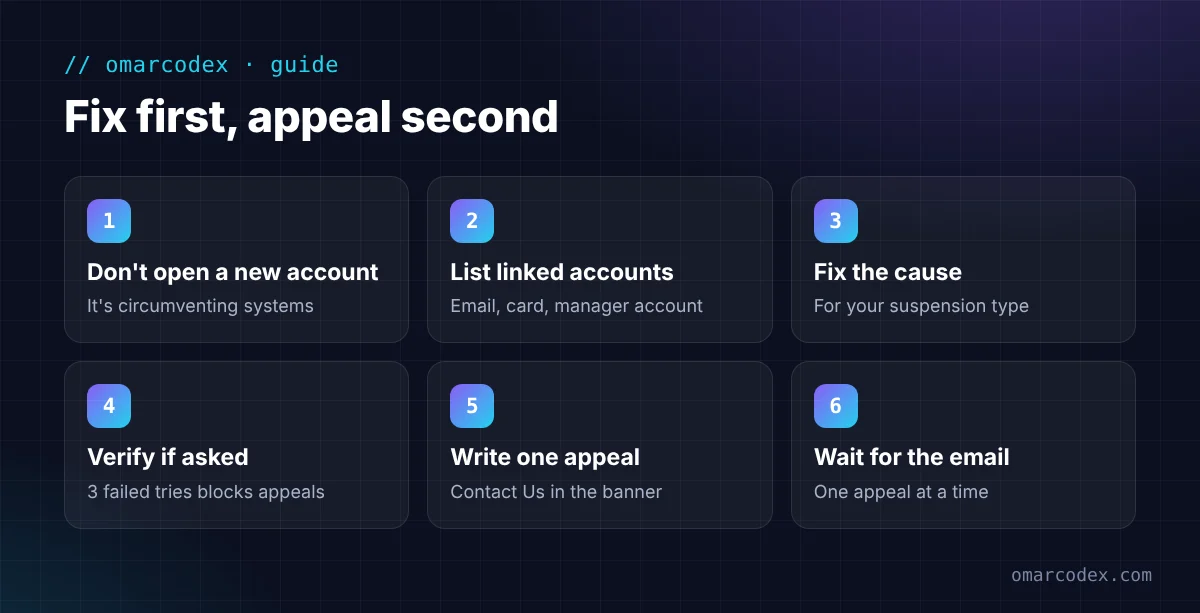
Here's the order we follow for store owners. The golden rule: fix first, appeal second.
Step 1: Don't open a new account
This is the most common mistake. Google's circumventing systems policy names "creating new accounts" after a suspension as a violation. Google also says it will suspend new accounts tied to you. You'd turn one problem into two.
Step 2: Check your linked accounts
Google may suspend accounts that share an email, a payment method, or a manager account with the suspended one. Make a list of every account linked to you, now or in the past. Each suspended account needs its own appeal.
Step 3: Fix the cause for your suspension type
For payment suspensions:
- Use a card or bank account in your own name or your business's name.
- Make sure the name and address on your payments profile match your card and your business.
- Pay any balance you owe.
- Watch for a verification request. Google may ask you to verify within 30 days. It can make a small test charge (up to $1.95) and ask for the code. Or it can ask for an ID and proof of address.
For circumventing systems:
- Stop running more than one account for the same business unless Google allows it.
- Remove redirects or scripts that show Google a different page than visitors see.
- Make sure the information you gave for verification is true and matches your documents.
For unacceptable business practices or misrepresentation:
- Show your real business name, address, phone, and email on your website.
- Make your shipping, return, privacy, and terms pages clear and specific.
- Remove claims you can't prove, fake reviews, and fake countdown timers.
- Only call yourself an "authorized dealer" if you can prove it.
For counterfeit:
- Remove products that copy a brand's name, logo, or design without permission.
- Keep supplier invoices for any branded goods you sell.
For malicious software:
- Check the Security Issues report in Google Search Console.
- Remove unknown apps, scripts, and plugins. Change your passwords.
- Keep a record of what you cleaned and when.
If this feels like a lot, you can get a free quote for your Google Ads suspension fix. We'll look at your account and site and tell you what we'd change first.
Step 4: Complete advertiser verification if asked
Some suspended accounts must finish advertiser verification before they can appeal. Google may ask for a photo ID, business registration, or business documents. Use the same legal name on every document.
Be careful here. Google's advertiser verification page says that if it can't verify you after 3 attempts, you won't be allowed to appeal. Status can take up to 5 business days to update.
Step 5: Write one clear appeal
Click Contact Us in the suspension banner. The appeal form opens on the right side of the screen. Keep your message short and factual:
- Name the policy in the notice.
- Say what you found.
- List each change you made, with dates.
- Attach proof if the form allows it, like invoices or documents.
Here's a simple structure you can follow in your own words: "We read the [policy name] policy. We found [problem]. We fixed it by [changes] on [date]. All linked accounts are now compliant. Please review our account."
Step 6: Wait, and don't spam appeals
Submit one appeal at a time. Google says it may not process them if you send too many for the same suspension. If it sees misuse, it can pause certain appeals for 7 days.
You'll get the result by email. If it's rejected, go back to Step 3, fix what you missed, and then appeal again. Google gives you at least 6 months from the suspension date to appeal.
Google Ads and Merchant Center: What Store Owners Should Know
For online stores, Google Ads and Merchant Center work together. A problem in one often shows up in the other.
- If Merchant Center is suspended, your Shopping and product ads stop, even if Google Ads looks fine.
- Business details should match in both: name, address, phone, and website.
- Shopify note: the Google & YouTube app links your store to both. Check that the business info and shipping settings it sends are correct.
Fix the Merchant Center side first if that's where the warning started. Then check Google Ads.
Common Mistakes That Keep Accounts Suspended
- Opening a new account. Google treats this as circumventing systems.
- Appealing before fixing anything. Google says to appeal only once the issue is fixed.
- Sending many appeals at once. Google may ignore them or pause your appeals.
- Using someone else's card. A card that doesn't match the account holder is a common payment trigger.
- Forgetting linked accounts. One suspended account can pull down others that share details.
- Hiring a "guaranteed" fixer. No one can promise Google's decision. Be wary of anyone who asks for your login, or who suggests a new account.
How to Prevent Another Suspension
- Use one account per business and one payment method in the business name.
- Keep your website, payments profile, and Merchant Center details the same.
- Read the policy before you advertise in health, finance, or branded products.
- Check your email and the Policy section in Google Ads every week.
- Keep your site secure and remove apps you don't use.
For a broader view of store suspensions, read our guide to Google Merchant Center suspension types. And if the notice says "circumventing systems," see our circumventing systems policy fix guide.
FAQ
How long does a Google Ads suspension appeal take?
Google doesn't publish a fixed time. You'll get the decision by email. If you're asked for advertiser verification, Google says the status can take up to 5 business days to update.
Can I get my remaining ad balance back?
Yes, in many cases. A suspended account can still cancel and request a refund of unused funds. Google explains this in its suspensions overview.
How many times can I appeal a Google Ads suspension?
Google doesn't set a fixed number, but it asks you to send one appeal at a time. Too many appeals for the same suspension may not be processed. You have at least 6 months from the suspension date to appeal.
Will a new Google Ads account fix the problem?
No. Google says new accounts you create may also be suspended. Its circumventing systems policy names this as a violation.
Why was my account suspended for suspicious payment activity?
Google couldn't trust the payment method or the person paying. Common causes are a card in another person's name, details that don't match, or failed payments. Google may ask you to verify the payment method.
Get Your Ads Running Again
A suspended Google Ads account feels like a locked door. But most suspensions have a clear cause. Find the policy named in the notice, fix it fully, check your linked accounts, and send one clear appeal.
Want help getting it right the first time? We fix Google Ads and Merchant Center suspensions for online stores. Get a free quote for your Google Ads suspension fix and we'll tell you where to start. You can also see our Google Merchant Center and ads service.
Written by Omar Faruk
Full-Stack Developer — WordPress, Laravel & Shopify
I'm a full-stack web developer who has shipped news portals, company sites, multi-user web apps and Shopify stores for clients around the world. I care about clean code, fast pages and websites that actually bring in sales.
Need help with this on your site?
I can set it up for you — quick turnaround, fixed price.


