
Shopify Server-Side Tracking: When You Need It & How to Set It Up

Shopify server-side tracking is the most hyped topic in ecommerce measurement right now. Vendors promise big jumps in "recovered" conversions. Some stores do gain a lot, and others pay monthly fees for data Shopify already sends for free. This guide explains what server-side tracking really changes, which option fits your store, and how I set it up.
By Omar Faruk, Shopify tracking developer · Last updated: October 31, 2026
Quick answer: Shopify server-side tracking sends conversion events to platforms like Meta, TikTok, Google Ads and GA4 from a server rather than only from the browser. Start with Shopify's free native options: Meta and TikTok server events and Google Ads enhanced conversions. Add a tracking app or server-side GTM only when you need more control.
Table of contents
- What is Shopify server-side tracking?
- What server-side tracking fixes, and what it does not
- Which server-side option fits your store?
- Do you need it? A simple decision guide
- Why a first-party subdomain matters
- What it costs to run
- How to set up Shopify server-side tracking with sGTM
- Deduplication: the step most setups get wrong
- How to verify tracking is working
- Troubleshooting server-side tracking
What is Shopify server-side tracking?
In classic client-side tracking, each pixel runs in the shopper's browser and sends data straight to Meta, TikTok or Google. With server-side tracking, events go to a server first, or are sent directly from a server. That server then forwards them to each platform.
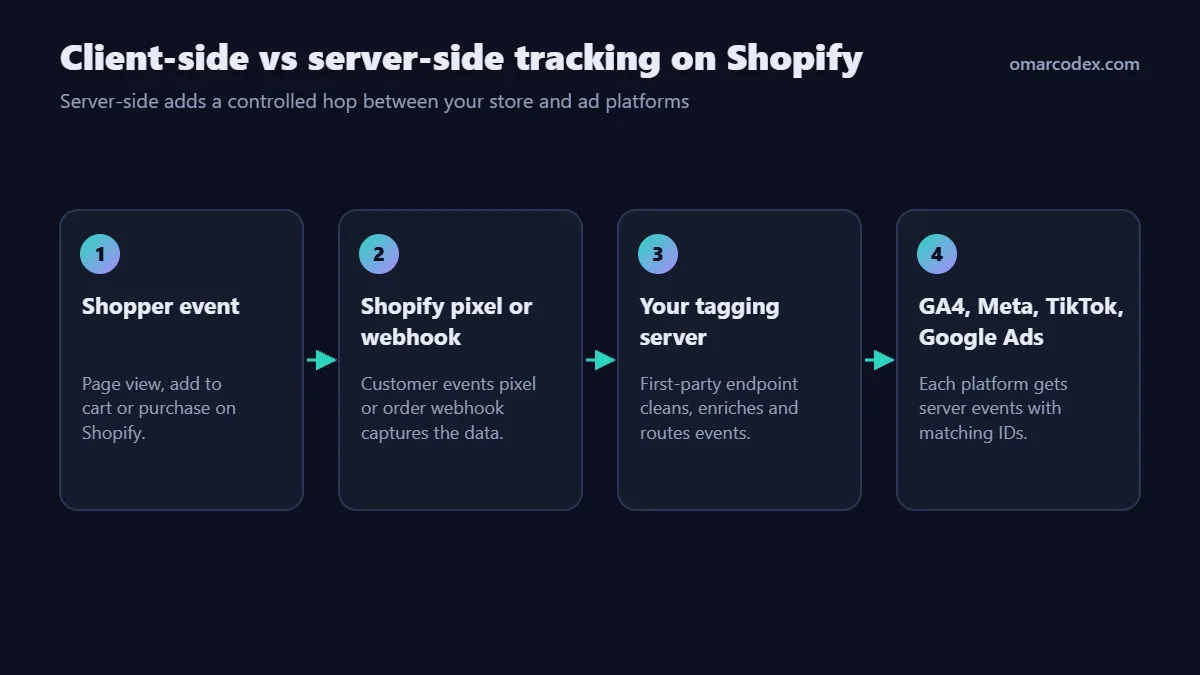
On Shopify, server events can come from three places:
- Shopify's own integrations, such as the Meta and TikTok apps, which send events from Shopify's servers.
- Tracking apps that run their own servers and forward events for you.
- Your own tagging server, usually server-side Google Tag Manager (sGTM), fed by a Shopify custom pixel or order webhooks.
What server-side tracking fixes, and what it does not
| Problem | Does server-side help? | Notes |
|---|---|---|
| Ad blockers blocking pixels | Yes, partly | Server requests to platforms are not blocked |
| Safari and iOS cookie limits | Yes, partly | First-party cookies set by your subdomain can last longer |
| Thank you page not loading | Yes, with webhooks | Order webhooks still fire |
| Low match quality | Yes | You can add hashed customer data on the server |
| Declined consent | No | You must still respect opt-outs |
| Duplicate tags and bad setup | No | Server-side makes duplicates easier to create |
| Wrong attribution settings | No | That is a platform setting, not a data problem |
The honest summary: server-side tracking improves data quality and completeness. It does not fix a messy setup. Clean up first.
Which server-side option fits your store?
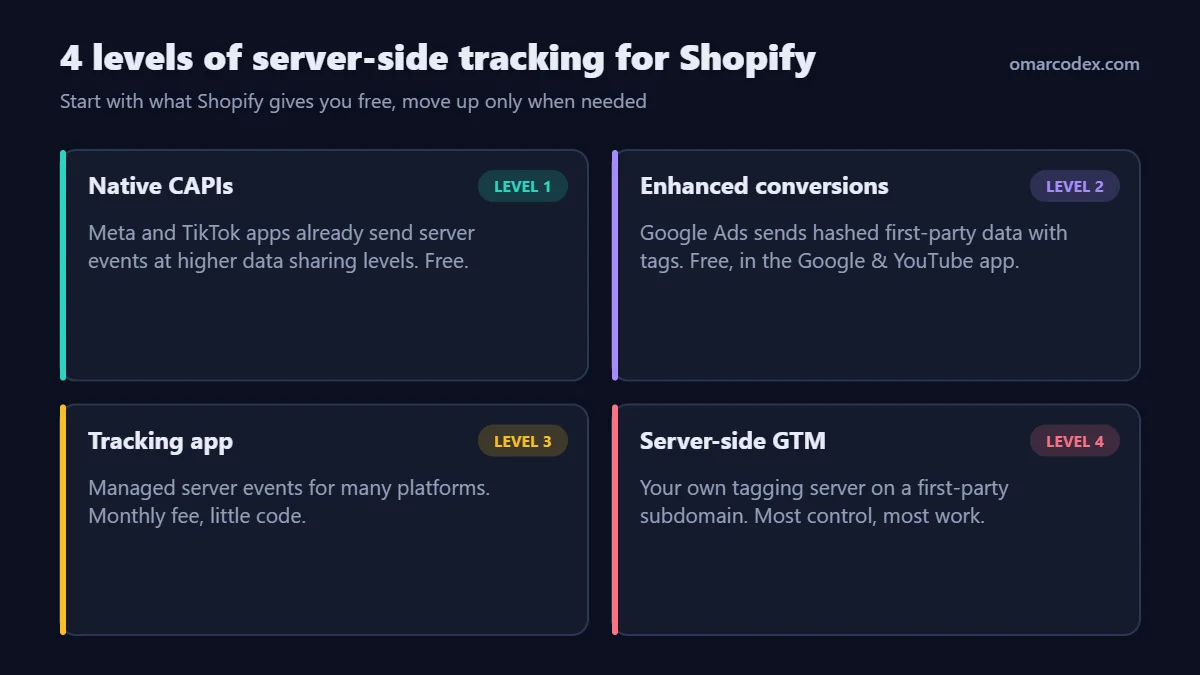
| Option | Platforms | Cost | Control | Effort |
|---|---|---|---|---|
| Meta app (Maximum data sharing) | Meta | Free | Low | 15 min |
| TikTok app (Maximum data sharing) | TikTok | Free | Low | 15 min |
| Google & YouTube app with enhanced conversions | Google Ads, GA4 | Free | Low | 20 min |
| Third-party tracking app | Several | Monthly fee | Medium | 1–2 hours |
| Server-side GTM (self-managed) | Any | Hosting plus developer time | High | 1–3 days |
If you are not using the free native options yet, start there. My guides cover each one: Shopify Meta Conversions API, TikTok conversion tracking on Shopify and Google Ads conversion tracking for Shopify.
Do you need it? A simple decision guide
I use these questions with clients before recommending paid server-side tracking:
- Are native server events already on? If not, turn them on and measure for two weeks first.
- How much do you spend on ads? A few lost conversions matter more when spend is high, because bidding depends on them.
- How many platforms do you run? One server pipeline for four platforms is easier to maintain than four separate apps.
- Do you need custom data? Profit margins, subscription renewals or lead quality usually need your own server.
- Who will maintain it? sGTM needs someone to watch it. An unmonitored tagging server can break quietly.
If you answer "yes" to questions 2–4 and have a plan for question 5, server-side GTM is usually worth it. Otherwise, native options or one well-chosen app will do.
Why a first-party subdomain matters
A first-party subdomain means your tagging server lives on your own domain, such as data.yourstore.com, instead of a vendor's domain. Browsers treat requests to it as part of your site. That has two practical benefits.
- Longer-lasting identifiers: cookies set by your server on your domain are less likely to be cut short than cookies set by third-party scripts.
- Fewer blocked requests: filter lists target well-known tracking domains, not your own subdomain.
Two cautions. First, if your store uses a Shopify subdomain like yourstore.myshopify.com as its main address, move to a custom domain first. Second, a first-party domain is not a way around consent. Configure the server to drop or limit events for shoppers who opt out.
What does server-side tracking cost to run?
Budget for three things, not just the software:
- Hosting or subscription: a tagging server or tracking app is usually a monthly bill that grows with traffic or orders.
- Setup time: a clean sGTM build with testing usually takes one to three days of developer time.
- Maintenance: platforms change their APIs and Shopify updates checkout events. Someone needs to check the numbers every month.
Compare that total with what better data could be worth. A store spending heavily on Meta and Google benefits more than a store with small ad budgets.
How to set up Shopify server-side tracking with sGTM
This is the self-managed route. It assumes basic GTM knowledge.
Step 1: Audit and set a baseline
List every pixel, app and tag currently sending events. Record two weeks of purchases per platform next to Shopify orders. You need this baseline to prove any improvement later.
Step 2: Turn on native server events
Set Meta and TikTok data sharing to Maximum, and turn on enhanced conversions in the Google & YouTube app. Decide per platform whether sGTM will replace the native integration or work alongside it. Never let two integrations send the same purchase without a shared event ID.
Step 3: Create the server container
- In Google Tag Manager, create a new container and choose Server.
- Deploy a tagging server with a cloud provider or a managed sGTM host.
- Map a first-party subdomain such as
data.yourstore.comto the tagging server.
Step 4: Send Shopify events to the server
- In Shopify, go to Settings → Customer events and add a custom pixel.
- Subscribe to standard events such as
product_viewed,product_added_to_cart,checkout_startedandcheckout_completed. - Send each event to your tagging server with a unique event ID, value, currency, items and available click IDs.
- Optional: send order webhooks to the server as a backup for purchases.
Step 5: Configure platform tags in the server container
Add a GA4 tag, a Meta Conversions API tag, a TikTok Events API tag and a Google Ads conversion tag. Map the event names, values and hashed user data for each. Use the same event ID the browser pixel sends.
Step 6: Test, then remove duplicates
Test each platform before you turn anything off. Then remove old senders one platform at a time, and watch the numbers for a week after each change.
Deduplication: the step most setups get wrong
When a browser pixel and a server send the same purchase, platforms need a way to know it is one order. Each platform uses an event ID for that:
| Platform | How duplicates are matched |
|---|---|
| Meta | Same event name plus same event ID |
| TikTok | Same event plus same event ID |
| GA4 | Same transaction ID on purchase |
| Google Ads | Same transaction ID (order ID) on the conversion |
Use the Shopify order ID, or a value derived from it, for purchases. Then retries, refreshes and dual sending will not create extra conversions.
How to verify tracking is working
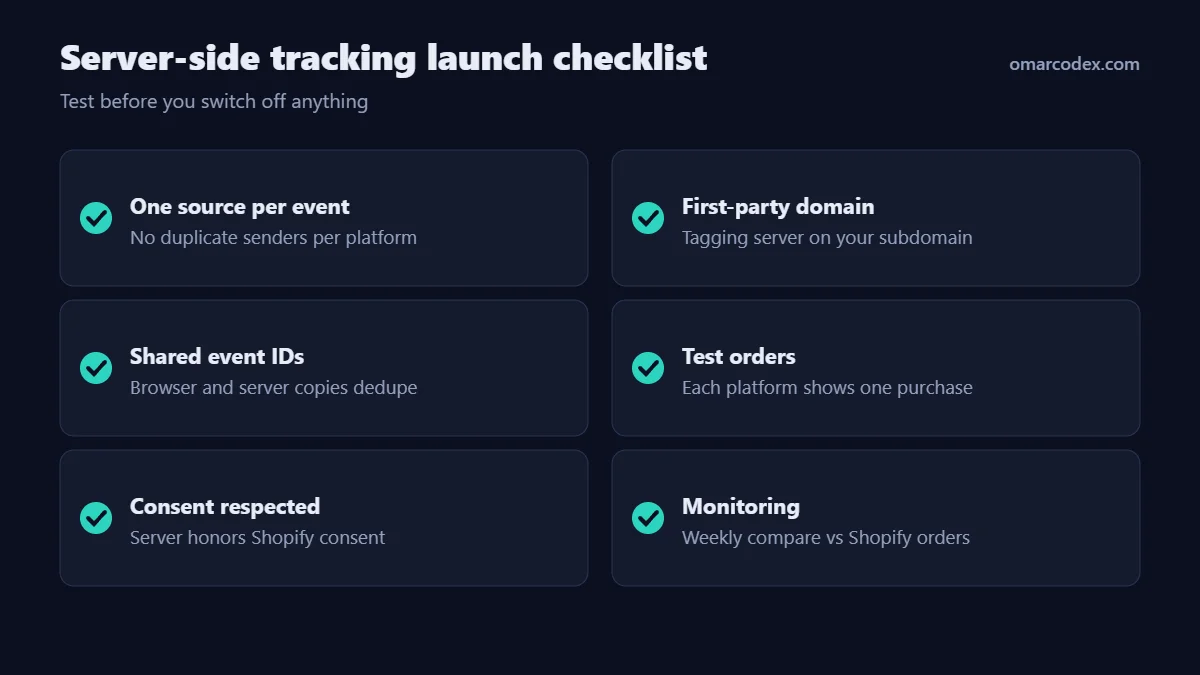
- Use preview mode in the server container to watch requests arrive and tags fire.
- Place test orders and check GA4 DebugView, Meta Test Events, TikTok Test Events and Google Tag Assistant.
- Confirm each platform shows one purchase with the right value and currency.
- Decline cookies in a test session and confirm your server respects that choice.
- For two to four weeks, compare purchases per platform with Shopify orders against your baseline.
Troubleshooting server-side tracking
| Problem | Likely cause | Fix |
|---|---|---|
| Purchases doubled on one platform | Native app and sGTM both send without shared ID | Use the same event ID, or turn off one sender |
| Server receives nothing | Custom pixel URL or subdomain DNS wrong | Check the pixel endpoint and DNS records |
| Events arrive, platforms reject them | Missing access token or wrong pixel/dataset ID | Recheck credentials in each server tag |
| Low match quality | Hashed user data or click IDs not passed | Forward email, phone, fbp/fbc, ttclid and gclid |
| Numbers drop after launch | Old sender removed before new one tested | Restore it and test the server path again |
| Tagging server costs rising | Too many low-value events sent | Send only events you use for bidding or audiences |
Related guides in this series
Official references: Google Tag Manager: Server-side tagging, Shopify.dev: Web pixels and Meta for Developers: Conversions API.
Conclusion
Shopify server-side tracking is a tool, not a magic fix. Turn on the free native server events first, clean up duplicates, and measure. If you then need multi-platform control, custom data or better match quality, a tracking app or server-side GTM pays off.
Not sure which level your store needs? I can review your setup and give you a clear plan. See my Shopify tracking service or contact me for a tracking audit.
About the author: Omar Faruk is a web developer who builds and fixes Shopify, WordPress and Laravel sites. He specializes in GA4, Meta, TikTok and Google Ads conversion tracking and Merchant Center fixes.
Written by Omar Faruk
Full-Stack Developer — WordPress, Laravel & Shopify
I'm a full-stack web developer who has shipped news portals, company sites, multi-user web apps and Shopify stores for clients around the world. I care about clean code, fast pages and websites that actually bring in sales.
Need help with this on your site?
I can set it up for you — quick turnaround, fixed price.


