
TikTok Conversion Tracking on Shopify: Pixel + Events API Guide (2026)

TikTok conversion tracking decides whether your TikTok ads can find buyers or just viewers. On Shopify, most broken setups I audit have the same problems. Data sharing is set too low, purchases fire twice, or the Events API was never turned on. This guide shows how I set it up and test it for client stores.
By Omar Faruk, Shopify tracking developer · Last updated: October 31, 2026
Quick answer: To set up TikTok conversion tracking on Shopify, install the official TikTok app, connect your Ads Manager account and select a TikTok Pixel. Set data sharing to Maximum so the Pixel, Advanced Matching and Events API all run. Then confirm the Complete Payment event with a test order in TikTok Events Manager.
Table of contents
- What is TikTok conversion tracking?
- Pixel vs Events API: how TikTok tracking works on Shopify
- Which setup method should you choose?
- How to set up TikTok conversion tracking on Shopify (step by step)
- Which TikTok events should you track?
- How to verify tracking is working
- Troubleshooting common TikTok tracking problems
- Why TikTok and Shopify numbers differ
- How attribution windows affect conversions
- UTM parameters for TikTok ads
- Value-based optimization
What is TikTok conversion tracking?
TikTok conversion tracking is how your store tells TikTok what people do after they see or click an ad. Each action is an event, such as View Content, Add to Cart or Complete Payment. TikTok uses these events for three jobs:
- Reporting: showing purchases, revenue and ROAS by campaign.
- Optimization: learning which people are likely to buy, so it shows ads to more of them.
- Audiences: building retargeting and lookalike audiences from site visitors and buyers.
If purchase data is missing or doubled, all three jobs suffer. That is why tracking quality matters more than any single ad creative.
Pixel vs Events API: how TikTok tracking works on Shopify
TikTok receives data in two ways. You should use both.
| Feature | TikTok Pixel (browser) | TikTok Events API (server) |
|---|---|---|
| Where it runs | Shopper's browser | Shopify's or your server |
| Blocked by ad blockers | Often | No |
| Affected by Safari/iOS limits | Yes | Much less |
| Captures click ID cookie | Yes | Only if passed from the browser |
| Setup on Shopify | Automatic with the TikTok app | Automatic at Enhanced or Maximum |
| Best use | Browsing signals and quick events | Reliable purchase data |
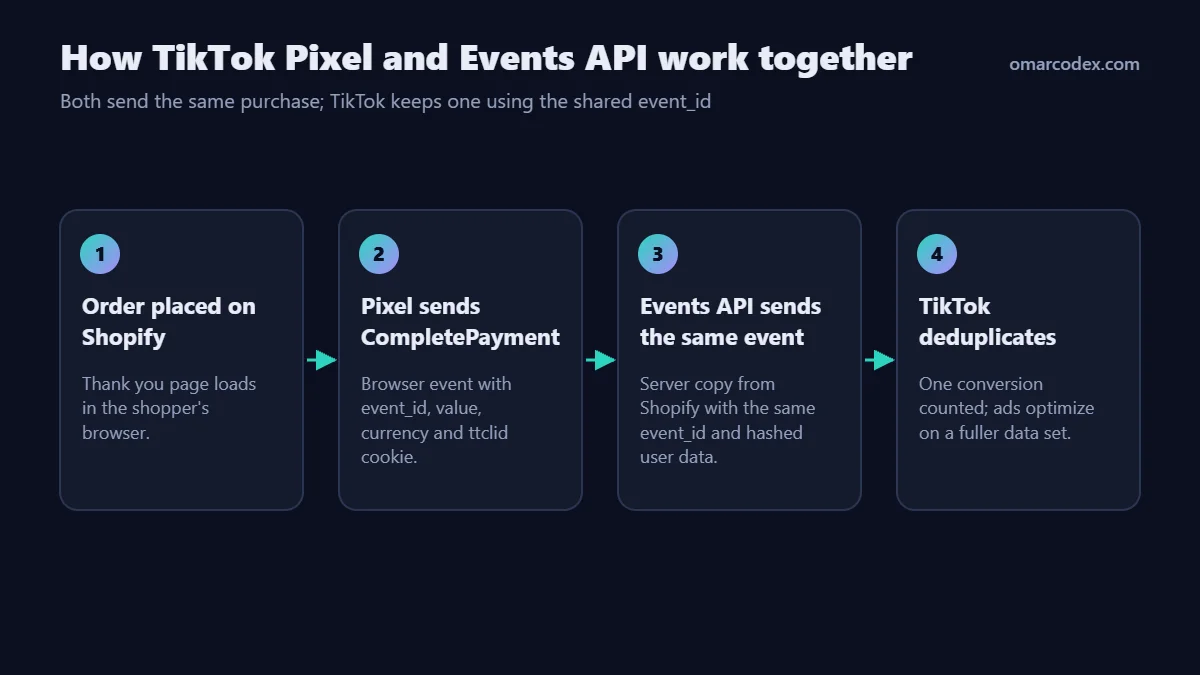
When both send the same purchase, TikTok deduplicates them with a shared event_id. The result is one conversion with the best data from each source.
Which setup method should you choose?
| Method | Pixel | Events API | Effort | Best for |
|---|---|---|---|---|
| Official TikTok app (Maximum) | Yes | Yes | 20–30 min | Most Shopify stores |
| Third-party pixel app | Yes | Usually | 30–60 min | Multiple pixels or custom rules |
| GTM in a Shopify custom pixel | Yes | No (browser only) | 2–5 hours | Custom events, developers |
| Server-side GTM | Yes | Yes | 1–3 days | High spend, many ad platforms |
| Pasting pixel code in theme.liquid | Partly | No | 15 min | Not recommended; misses checkout events |
For most US stores, the official app at Maximum data sharing is the right start. If you run several ad platforms, read my guide to Shopify server-side tracking before you add more apps.
How to set up TikTok conversion tracking on Shopify (step by step)
You need Shopify admin access and a TikTok For Business account with Ads Manager access.
Step 1: Install the TikTok app
- In Shopify admin, go to the Shopify App Store and search for TikTok.
- Install the official app published by TikTok.
- Log in with TikTok For Business and connect your Business Center and Ads Manager account.
- Accept the terms and confirm your store details and target market (United States).
Step 2: Create or connect your TikTok Pixel
- In the app, open the Data sharing settings.
- Create a new pixel, or select an existing one if you already run ads.
- Use one pixel per store. Splitting data across pixels weakens optimization.
Step 3: Choose the data sharing level
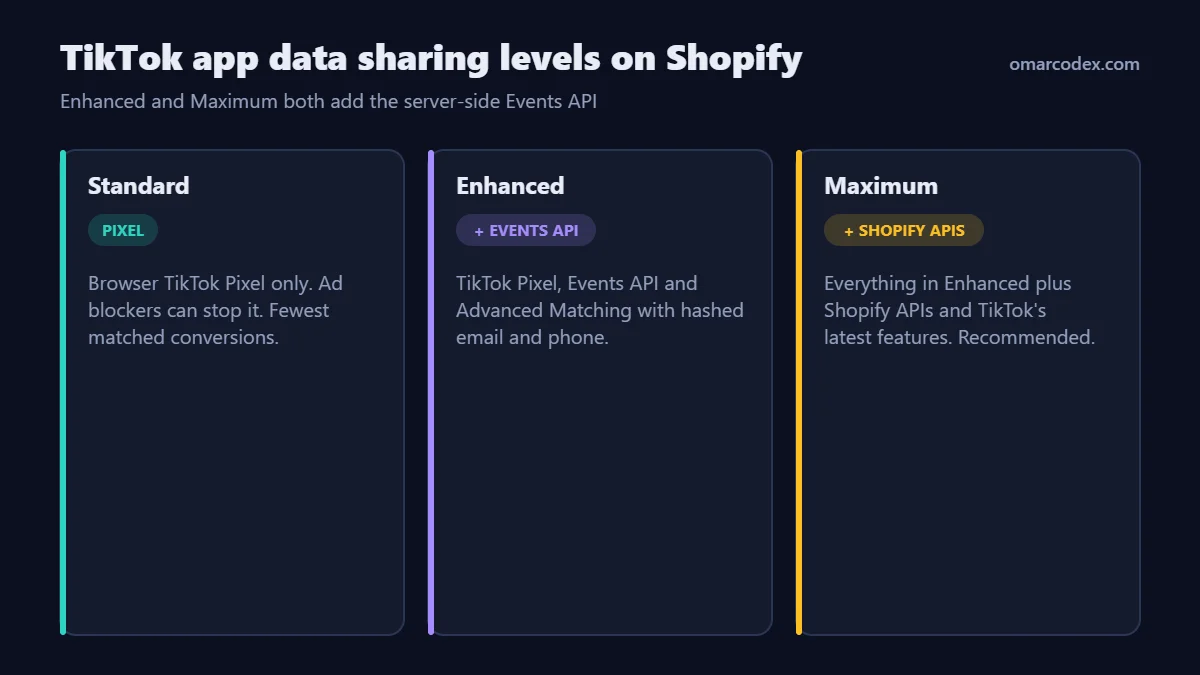
- Standard: TikTok Pixel only. Browser ad blockers can stop it.
- Enhanced: TikTok Pixel, Events API and Advanced Matching with hashed customer data.
- Maximum: everything in Enhanced, plus Shopify APIs and TikTok's newest features as they launch. Choose this one unless your privacy policy rules it out.
Update your privacy policy to mention data sharing with TikTok, since Advanced Matching sends hashed personal data.
Step 4: Remove duplicate TikTok pixels
- Search
theme.liquidforttq.loadoranalytics.tiktok.com. - Check Settings → Customer events for custom pixels sending TikTok events.
- Remove TikTok tracking from other apps unless you deliberately use that app instead.
Step 5: Set up consent
Turn on Shopify's customer privacy banner or a compatible consent app. The TikTok app respects Shopify's consent signals. Expect fewer browser events from visitors who opt out.
Step 6: Pick the optimization event in Ads Manager
For sales campaigns, optimize for Complete Payment. Only use Add to Cart or Initiate Checkout while a new pixel has too few purchases to learn from. Switch to Complete Payment once you have steady weekly purchases.
Which TikTok events should you track?
The TikTok app on Shopify supports these standard events:
| TikTok event | Shopify action | Main use |
|---|---|---|
| View Content | Product page view | Retargeting, catalog ads |
| Search | Storefront search | Intent signals |
| Add to Cart | Item added to cart | Early optimization, retargeting |
| Initiate Checkout | Checkout started | Abandoned checkout audiences |
| Add Payment Info | Payment step completed | Late-funnel analysis |
| Complete Payment | Order confirmed | Sales optimization and ROAS |
| Complete Registration / Subscribe | Account or newsletter sign-up | Lead campaigns |
Make sure Complete Payment includes value, currency and product contents. Without value, TikTok cannot report ROAS or use value-based optimization.
How to verify tracking is working
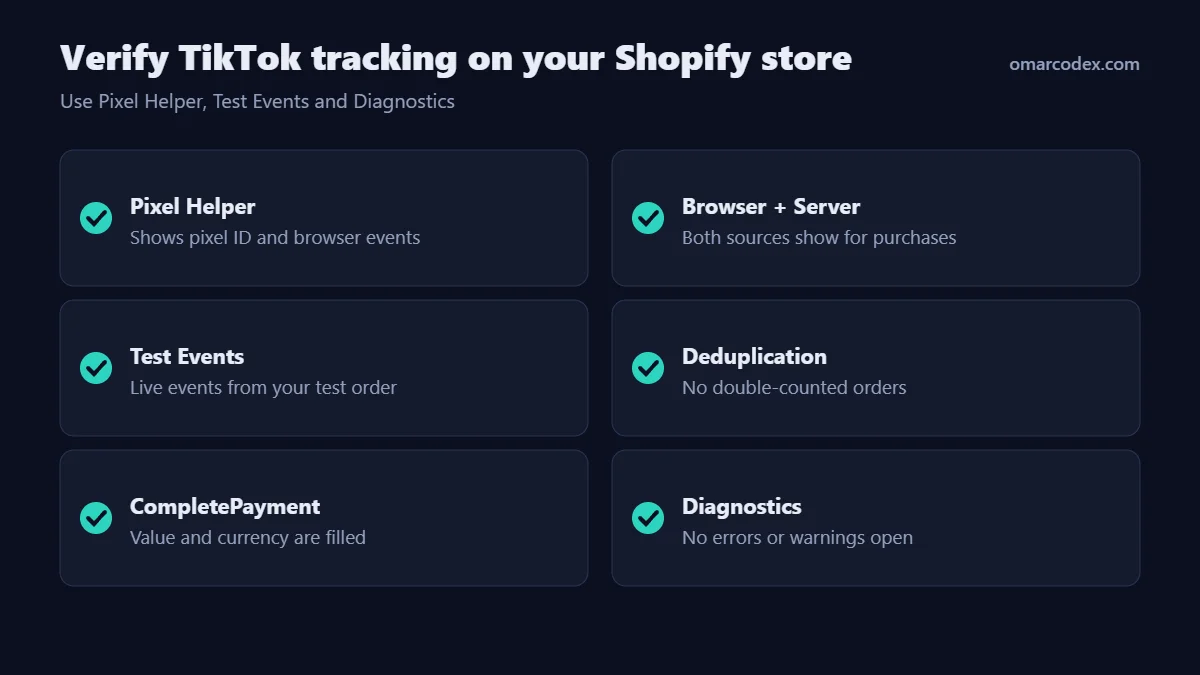
- Pixel Helper: install the TikTok Pixel Helper Chrome extension. Open your store and confirm the right pixel ID loads with View Content and Add to Cart.
- Test Events: in TikTok Events Manager, open your pixel and go to Test Events. Open your store from there and place a test order with a 100% discount code.
- Check Complete Payment: it should appear once, with the correct value and currency.
- Check both sources: after a few hours, the event overview should show browser and server activity for purchases.
- Check deduplication: the number of Complete Payment events should be close to your Shopify order count, not double.
- Check Diagnostics: fix any warnings about missing parameters or low match quality.
Troubleshooting common TikTok tracking problems
| Problem | Likely cause | Fix |
|---|---|---|
| No Complete Payment events | Wrong pixel selected or app not fully connected | Reconnect the app and reselect the pixel |
| Purchases doubled | Theme code or second app also sends events | Keep one source and remove the rest |
| Revenue missing or $0 | Event sent without value or currency | Use the official app or fix custom event parameters |
| Only browser events, no server | Data sharing set to Standard | Switch to Enhanced or Maximum in the TikTok app |
| Low match quality warnings | Data sharing set to Standard, or checkout missing customer data | Use Enhanced or Maximum data sharing |
| Conversions far below Shopify | Consent declines, ad blockers, attribution window | Turn on Events API and compare same windows |
Why TikTok and Shopify numbers differ
TikTok and Shopify answer different questions. Shopify counts every order. TikTok counts orders it can link to an ad within its attribution window, including some view-through conversions. Check your attribution settings in Ads Manager before comparing.
For an independent view, compare TikTok with GA4 using UTM tags. My Shopify GA4 conversion tracking guide shows how to make GA4 purchases reliable first.
How do TikTok attribution windows affect reported conversions?
An attribution window is the time after an ad click or view during which TikTok credits a purchase to that ad. TikTok lets you choose click-through and view-through windows in Ads Manager. A longer window credits more purchases to TikTok. A shorter window credits fewer.
Here is how I advise US stores to read the numbers:
- Click-through conversions are the strongest signal. The shopper clicked your ad and later bought.
- View-through conversions are softer. The shopper saw the ad, did not click, and bought later. Some of those buyers would have bought anyway.
- Change windows rarely. Switching windows mid-campaign makes week-to-week comparisons meaningless.
When you report results to a client or your team, show click-through and view-through conversions in separate columns. That keeps the conversation honest.
Should you add UTM parameters to TikTok ads?
Yes. UTM parameters let GA4 and Shopify see TikTok traffic without relying on TikTok's own reporting. Add them in the ad's URL parameters field, for example:
utm_source=tiktok&utm_medium=paid_social&utm_campaign=__CAMPAIGN_NAME__
TikTok supports dynamic macros such as campaign and ad names, so you do not have to type them for every ad. Keep utm_source and utm_medium consistent across all campaigns. GA4 groups traffic into channels using these values, and messy naming splits TikTok into several rows.
How to get value-based optimization working
Value-based optimization tells TikTok to find buyers who spend more, not just more buyers. It only works if purchase events carry clean revenue data. Before you switch a campaign to value optimization, check three things:
- Every Complete Payment event has a numeric
valueand acurrencysuch as USD. - The value matches what you want to optimize. Most stores use order subtotal after discounts.
- You have enough purchase volume. With very few weekly purchases, TikTok has too little data to model value.
If your store sells through TikTok Shop as well as Shopify, keep those orders in mind. They are tracked differently from website purchases, so they will not appear as website Complete Payment events.
Related guides in this series
- Shopify conversion tracking overview for GA4, Meta and TikTok
- How to set up the Meta Conversions API on Shopify
- Google Ads conversion tracking for Shopify
Official references: TikTok: About TikTok Pixel for Shopify, TikTok: Supported events by Shopify and TikTok: Data sharing on the TikTok app for Shopify.
Conclusion
Reliable TikTok conversion tracking on Shopify comes from a simple setup done carefully. Use the official app, set data sharing to Maximum, keep one pixel and test every purchase. Then TikTok's algorithm gets the clean data it needs to find buyers.
Want me to check your TikTok, Meta and GA4 tracking in one pass? See my Shopify tracking service or contact me for a tracking audit.
About the author: Omar Faruk is a web developer who builds and fixes Shopify, WordPress and Laravel sites. He specializes in GA4, Meta, TikTok and Google Ads conversion tracking and Merchant Center fixes.
Written by Omar Faruk
Full-Stack Developer — WordPress, Laravel & Shopify
I'm a full-stack web developer who has shipped news portals, company sites, multi-user web apps and Shopify stores for clients around the world. I care about clean code, fast pages and websites that actually bring in sales.
Need help with this on your site?
I can set it up for you — quick turnaround, fixed price.


